Top 5 Privileged Access Management Best Practices for 2026
Discover the top 5 privileged access management best practices every enterprise must adopt in 2026 — from least privilege enforcement and credential rotation to session monitoring, Zero Trust, and access reviews.
Introduction
The cybersecurity landscape is constantly shifting, but one fact remains unchanged in 2026: compromised administrative credentials are the leading cause of massive data breaches. When cybercriminals target your network, they do not want standard user accounts; they want the "keys to the kingdom." To stop them, modern enterprises must adopt strict Privileged Access Management Best Practices.
Securing these critical pathways requires more than just a password vault. It demands a comprehensive strategy that protects identities, monitors activity, and limits access across your entire infrastructure.
Why PAM Best Practices Matter Today
High-level accounts — such as domain admins, database managers, and third-party vendor accounts — hold immense power. If left unmanaged, they create catastrophic security blind spots. Implementing strong pam best practices ensures that these accounts are tightly controlled, reducing the risk of insider threats and external lateral movement.
To achieve this level of security, organisations rely on OmniPriv. By utilising a comprehensive privileged identity management solution, IT teams can govern high-risk identities and enforce policies without slowing down daily business operations.
1. Enforce the Principle of Least Privilege (PoLP)
Never give users more access than they need to perform their specific job functions. Removing standing local admin rights from standard endpoints is the single most effective way to prevent malware from spreading. Access should be granted just-in-time and revoked immediately after the task is completed.
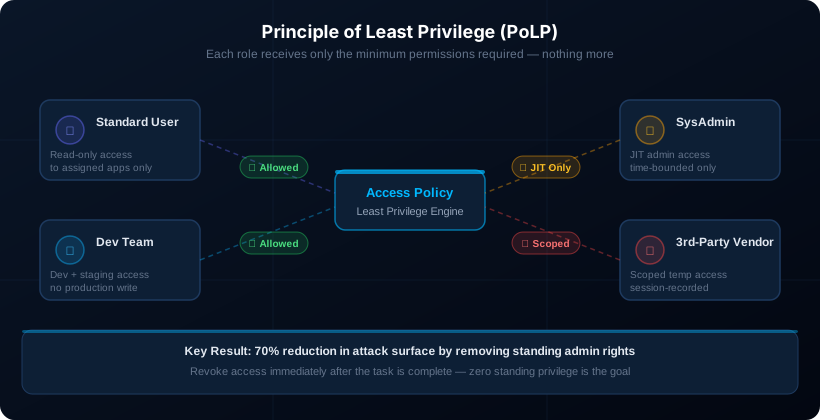
The principle of least privilege is the cornerstone of every effective PAM programme. Every user, service account, and automated process should operate with the minimum set of permissions needed — nothing more. When an account is compromised, least privilege limits the blast radius to only the resources that account could legitimately reach.
2. Secure and Rotate Credentials Automatically
Static passwords are a massive liability. One of the most critical Privileged Access Management Best Practices is to store all administrative passwords, SSH keys, and secrets in an encrypted vault. Furthermore, these credentials should be automatically rotated after every use to ensure they cannot be stolen and reused.
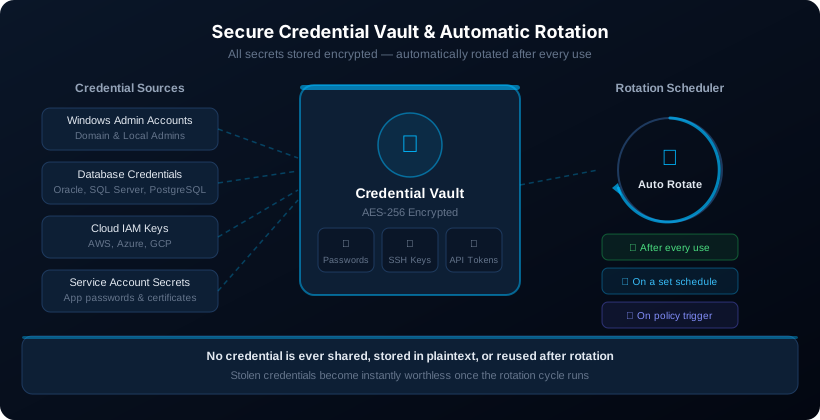
OmniPriv's credential vault handles AES-256 encrypted storage for every credential type — Windows admin passwords, Linux SSH keys, database connection strings, cloud IAM keys, and API tokens. Rotation schedules are configurable per credential class, and high-sensitivity credentials can be rotated after every single checkout. For deeper guidance on managing one of the highest-risk credential types, see our SSH key management guide.
3. Monitor and Record All Privileged Sessions
Visibility is vital for both security and compliance. OmniPriv's privileged access management platform allows you to record, log, and monitor every action taken during an administrative session in real-time. If suspicious activity occurs, security teams can instantly terminate the connection.
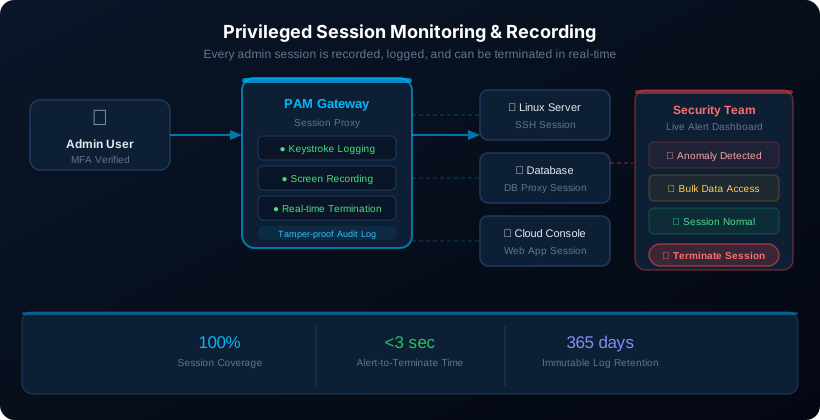
Session recording provides two critical benefits. First, it deters insider threats — people behave differently when they know their actions are logged. Second, it accelerates incident response: when a security event occurs, investigators can replay the exact session rather than reconstructing activity from incomplete log fragments. Session data is stored with tamper-proof controls, satisfying audit requirements under SOC 2, PCI-DSS, and HIPAA.
4. Implement Zero Trust for Admin Accounts
Never assume a user is safe simply because they have the right password. Require multi-factor authentication (MFA) at every point of elevated access. Contextual factors like location, device health, and time of day must be verified before granting system access.
Zero Trust architecture for privileged accounts means eliminating all implicit trust. Every access request is evaluated at the time of the request — network location, VPN status, and previous authentications do not grant standing trust. OmniPriv acts as a bastion host control plane: no direct connections from end-user devices to servers or databases. Every session is proxied, authenticated, authorised against live policy, and monitored continuously.
5. Conduct Regular Access Reviews
Over time, users accumulate permissions they no longer need — a concept known as privilege creep. Conducting regular access audits ensures that your baseline permissions align with current business roles, keeping your pam best practices sharp and effective.
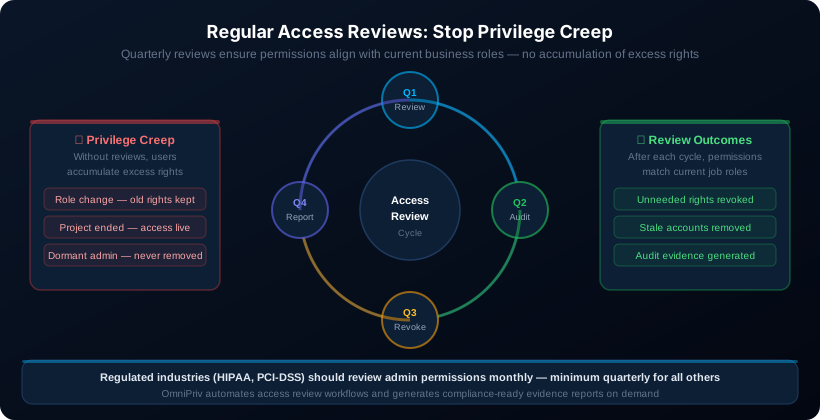
Access reviews should be conducted at minimum quarterly. Organisations subject to PCI-DSS, HIPAA, or SOC 2 should target monthly reviews for their highest-privilege accounts. OmniPriv automates the review workflow: account owners receive structured review requests, confirm or revoke access in a guided interface, and the decisions are automatically applied and logged with full audit context — no spreadsheets required.
How to Implement Privileged Access Management
Many IT leaders struggle with the deployment phase. If you are wondering how to implement privileged access management smoothly, the key is a phased approach.
- Start with a discovery scan to find all unmanaged and hidden admin accounts on your network
- Secure the most critical assets first — such as domain controllers and financial databases
- Deploy credential vaulting, MFA, and session recording as the priority tier
- Once top-tier accounts are safely managed, gradually extend policies to standard servers, cloud workloads, and third-party vendors
- Establish quarterly access review cycles and automate rotation before moving to the next tier
Following these Privileged Access Management Best Practices step-by-step minimises IT disruption and ensures high user adoption. For the complete enterprise deployment roadmap, see our Complete 2026 PAM Guide.
FAQs
What is the most important step in securing admin accounts? The most critical step is enforcing the principle of least privilege. Removing permanent administrative rights and replacing them with temporary, just-in-time access drastically reduces your attack surface.
How to implement Privileged Access Management Best Practices without downtime? Begin with a comprehensive account discovery process. Vault your most critical tier-1 credentials first, then apply multi-factor authentication and session recording before expanding to the rest of the organisation.
Why do I need a dedicated privileged identity management solution? Standard identity tools manage everyday users, but a dedicated privileged identity management solution specifically governs the lifecycle, approval workflows, and entitlements of high-risk administrative accounts that require stricter oversight.
How often should we review our privileged access policies? Access reviews should be conducted at least quarterly. However, organisations in highly regulated industries should audit administrative permissions monthly to prevent privilege creep.
How does OmniPriv improve enterprise security? OmniPriv provides a unified platform that automates credential vaulting, enforces least privilege, and monitors sessions — ensuring your organisation easily aligns with core pam best practices. It simplifies complex security workflows so IT teams can protect infrastructure efficiently and reduce the risk of compromised admin accounts.
See OmniPriv in Action
Talk to our team to see how OmniPriv addresses the challenges in this article for your specific environment.